
Upload a photo with the outfit area visible
Choose a clear portrait that shows the shoulders, waist, skirt area, and pose needed for the dress. Full-body photos work best when the hem and shoes matter.
Upload a person photo and a dress reference to preview a new evening, wedding guest, party, work, or everyday look while keeping the original person and scene recognizable.
This workflow is deliberately narrower than general virtual try-on: the dress is the editing target. A useful request identifies the neckline, sleeve treatment, waist construction, skirt shape, hem position, and material while explicitly protecting the face, body, pose, hands, and location.
Start by matching the reference to what the portrait actually shows. A waist-up photo can support a neckline or sleeve change, but it cannot demonstrate a reliable midi or maxi hem. Once the silhouette reads clearly, correct one dress-specific feature instead of regenerating the entire scene.
The current homepage example keeps the subject and scene consistent while comparing pink, white, and purple formal dress directions, making silhouette and styling differences easier to review.
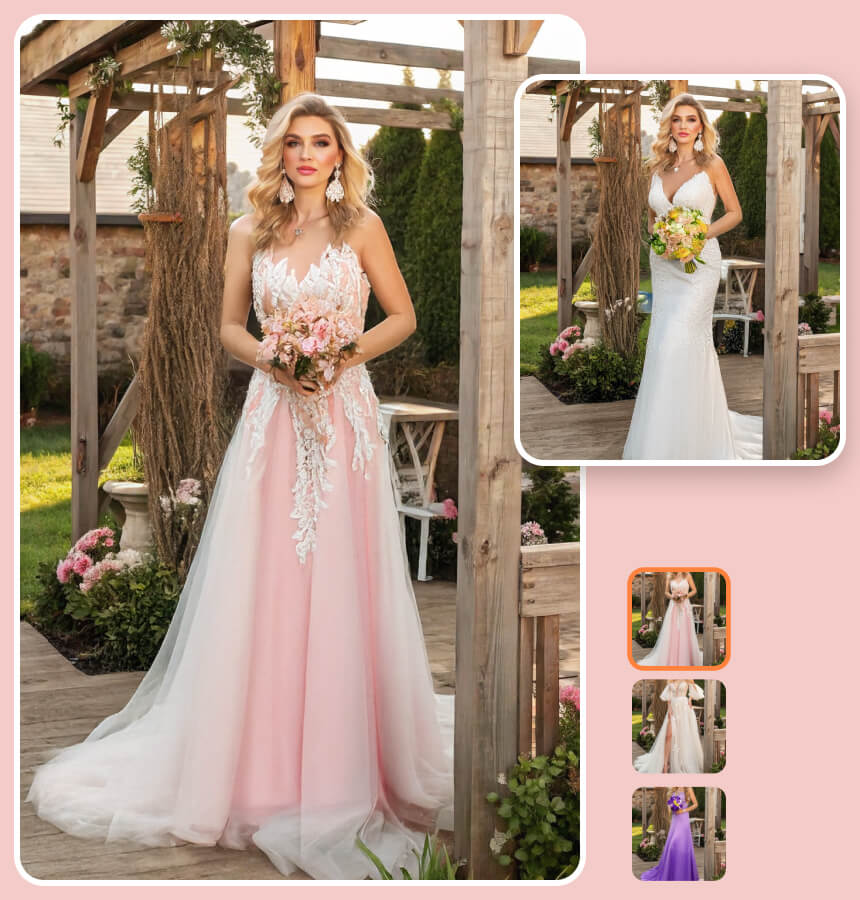
Replace only the dress with the selected formal direction. Preserve the same adult person, face, hair, body proportions, pose, bouquet, background, camera angle, and lighting.
Choose a clear portrait that shows the shoulders, waist, skirt area, and pose needed for the dress. Full-body photos work best when the hem and shoes matter.
Use a front-facing product photo, mannequin image, flat lay, or permitted screenshot with a visible neckline, sleeves, waist, hem, color, and material.
State whether the result is for an evening event, wedding guest look, work setting, or casual day. Ask the editor to preserve the person, pose, hands, scene, and lighting.
The generated image cannot confirm size, tailoring, comfort, fabric quality, availability, or exact color. A dress that appears balanced in a still image may behave differently when sitting, walking, or viewed under different light.
Fine lace, typography, branded details, repeating prints, closures, and hidden construction can be reinterpreted. Inspect the output carefully and confirm important decisions with measurements, original product photography, or a professional fitting.
Define the occasion first, then choose a compatible silhouette, length, material, and level of formality for the existing portrait.
Compare guest-appropriate colors, lengths, sleeves, and silhouettes while avoiding white bridal styling and confirming the real event dress code separately.
Explore satin, velvet, sequined, minimal, or dramatic directions against the same portrait before choosing a final concept.
Test relaxed shirt dresses, knit dresses, linen shapes, or layered seasonal looks without changing the original setting.
Create an early visual reference for a campaign, social post, mood board, thumbnail, or styling discussion before final production.
Dress-specific answers about reference images, sleeves, color, hems, wedding inspiration, construction details, and purchase limits.
Yes. Name the dress as the only change and list the portrait details that must remain unchanged.
A permitted screenshot can work when the full dress is visible against a clear background.
Yes, for inspiration. The image cannot verify tailoring, size, fabric quality, construction, or movement.
The source may hide that area. Use a clearer reference and refine the specific element once.
No. Logos, lace, seams, patterns, closures, hidden areas, and precise color may differ.
Use a front-facing image showing the neckline, sleeves, waist, skirt, and hem in even light.
Yes. Preserve the silhouette, neckline, sleeves, hem, and material while naming the new color.
Yes. Name the sleeve style or hem length and keep the remaining dress description stable.
List the face, hair, expression, pose, crop, background, and lighting as preservation priorities.
Use it for style comparison only. Verify measurements, tailoring, material, movement, stock, and returns separately.
Upload a portrait that shows the required dress area, add one clear dress reference, and name the neckline, silhouette, material, and hem you want to preserve.