
Choose a useful person photo
Use a well-lit full-body or three-quarter image where the current clothes and body outline are visible. A natural standing or seated pose can work when arms, bags, or furniture do not hide the garment area.
Upload your photo and a clothing reference to create a personalized virtual outfit preview. Compare style and color directions online while keeping real-world sizing and fit expectations clear.
AI virtual try-on is a broad comparison tool for the stage before a purchase or styling decision. It helps answer whether a color family, silhouette, layer, or dress-code direction deserves a closer look on a familiar photo. For an edit focused only on a dress, use the dedicated dress changer instead.
Keep one person photo fixed and compare one garment direction at a time. That creates a more useful visual shortlist than changing the pose, location, accessories, and clothing together. After narrowing the direction, return to the retailer for measurements, materials, reviews, availability, and returns.
Use a well-lit full-body or three-quarter image where the current clothes and body outline are visible. A natural standing or seated pose can work when arms, bags, or furniture do not hide the garment area.
Upload a clear product image, wardrobe photo, or permitted screenshot of the outfit you want to explore. Front-facing references with visible fabric, color, sleeves, and hem give the model more information.
Create the first virtual outfit preview, check the overall silhouette and color direction, then refine one visible detail such as sleeve length, layering, or accessories while preserving the person and scene.
This current homepage example keeps the adult subject and outdoor setting recognizable while comparing a floral reference with a stronger patterned dress direction.
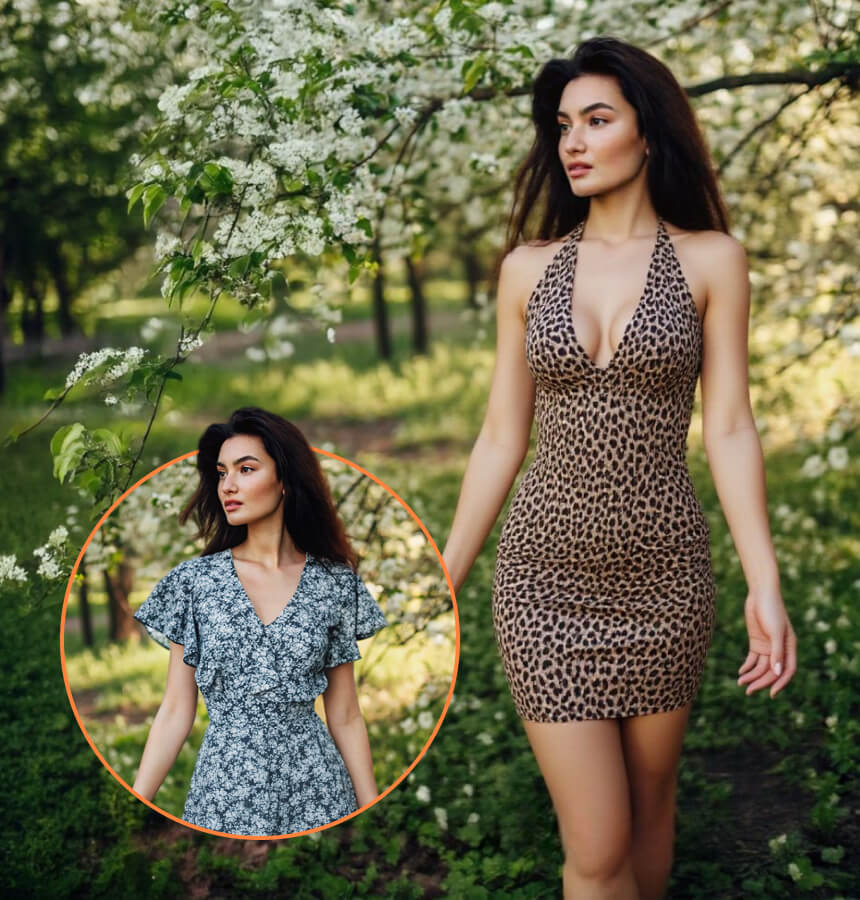
Apply the referenced dress direction with believable drape and pattern scale. Preserve the same adult, pose, hands, foliage, camera angle, perspective, and natural lighting.
Use the same source portrait as a visual baseline, then compare color, layering, occasion, or silhouette as separate decisions.
Preview a warm neutral, deep green, navy, or brighter seasonal color on the same photo before deciding which direction deserves a closer look.
Explore lightweight layers, resort looks, outerwear, or event clothing against a familiar photo before packing or building a shopping list.
Turn a written concept into a visual reference that can be shared with a friend, stylist, client, or creative collaborator.
Use generated previews to compare silhouettes and styling themes before collecting final products, photography, and production references.
AI-generated clothing can help you explore appearance, but it cannot simulate the physical behavior of a specific garment. Body measurements, grading, stretch, lining, closures, fabric weight, and movement all affect how real clothing fits.
Small construction details can also change during generation. Treat text, logos, patterns, seams, buttons, accessories, and exact color as details that require inspection. Use the result for inspiration and comparison, then rely on the original product information for purchasing decisions.
Answers about online-store references, outfit comparisons, image formats, layered looks, and the limits of purchase guidance.
No. It visualizes an outfit direction but cannot confirm size, comfort, material, stock, or physical fit.
Yes, with a permitted product image. Verify measurements, materials, stock, and returns on the original store page.
Use one for complete outfits and shoes. A clear three-quarter portrait can work for tops and jackets.
Yes. Keep the source photo and resolution stable, then test one garment or color at a time.
Not always. Text, seams, patterns, hidden construction, exact color, and fit may change during generation.
A clear JPG, PNG, or WebP works well when the person and garment details remain easy to inspect.
Yes. Show the jacket structure clearly and state which base garments should remain visible.
Match the visible pose, describe material and silhouette, preserve lighting, and refine one problem at a time.
Use it for broad comparison only, then check real measurements, fabric details, reviews, and availability.
No. The tool returns a separate generated result. Keep the original and review the Privacy Policy before uploading.
Keep the person photo stable, upload one garment direction, and use the result to narrow a visual shortlist before checking the real product.